Marketing and Mobile Applications
Most of us have become entirely mobile-dependent for most of his life activities, so if you're considering creating an app to help you interact with your target audience and increase the success of your business, let's know how you do it together.
Don't confuse mobile marketing with mobile apps, mobile marketing includes both MMS messages, SMS messages, mobile apps, mobile ads, and compatible websites. While mobile apps focus on promoting apps and most importantly knowing how users interact with them.
The statistic shows the upload rate of applications made during the two years 2018,2017 and what is expected to be uploaded through 2022...
Did you notice those numbers well?!
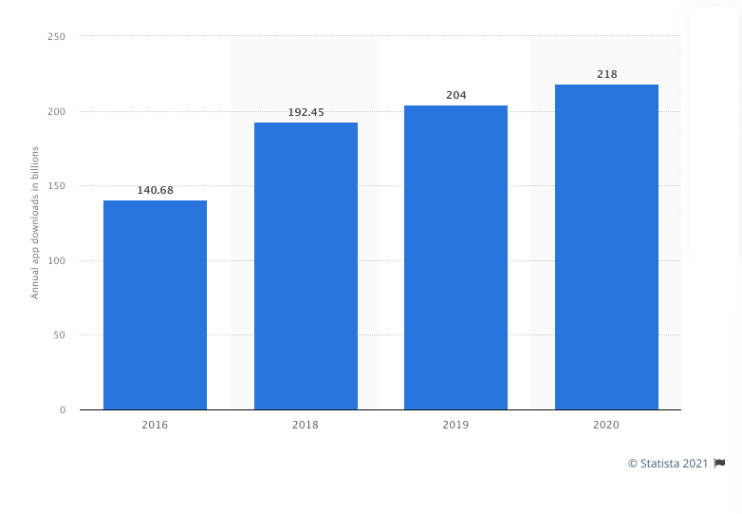
So how do you get anybody to hold your app amid this huge amount of applications?
That's why you need a strategy to get your target audience's attention toward your app and you win this race.
There are several steps you have to follow to launch a successful app:
1. Understand your target audience
Understand your target audience first and know what features they want to get from the app, how they use it, what problem they face and how your app solves it, how the app helps make their lives better and easier.
It will be easy to know all this information when analysing the information for the target group (age-sex-location-level education-income level-interests-hobbies -... And other information that makes you aware of them.
You have to make it easy to use your app and the user has a daily habit of it that you don't need to make them think too much before doing any action because that will make the app stressful for them.

2. Analysis of competitors
"Anytime you find someone more successful than you, especially when you're involved in the same business, I know they're doing something you're not doing." Malcolm X
Before creating the app you have to study competitors (at least 3 strongest of them) to see what features their apps have, and why users prefer these apps
- What are her names suitable for the target audience or difficult for them?
- What disadvantages users complain about and try to avoid in your app
- How many uploads did their apps get
- What keywords do they rely on
- What promotional plans for application they rely on
- What is the competitive advantage of each app and can you offer better ones?
- What assessments and reviews have been obtained by the applications
- When was the last time the apps were updated and what did users react then.
3. Start promoting your app
Promote your app before you even software it, giving users an idea of the app and starting to form a group of target audiences who are passionate about trying the new app, rather than finishing the entire app and then starting to think about how you attract your target audience to use it. Start promoting the app by:
If you have a website that you start promoting your app through, visitors to your site know how the app helps them communicate with you better and make their lives easier. Use your site blog to post content that is good for your audience and at the same time related to what your app offers. Take care of the keywords in the content you write so it helps you get a higher ranking in the search engine, even if someone searches for your app it's easy to find.
Take advantage of your social media presence and start spreading news about your app and what stage it has reached so far and, most importantly, to observe the rules of publishing on social media platforms, including regular publishing and when your audience is present. Use the hashtag related to your app and domain, share some footage of what's in the app and if you create a short video share it with them to arouse curiosity and make them interested in when the app will be launched. set aside time to answer questions you get about the app and don't ignore any question.
If you have a site, a blog, or even a Form 1 page, use them to build a list of your email and start communicating with your target audience through messages to tell them each period about the latest updates the app has reached and when to finish them and enquired if they would prefer to receive messages later on the news of the app and when it would be launched to find out who was eager to use the app and who was not.
Start paying attention to closer relationships with bloggers, influencers... and others, after which you can use these relationships before launching to advertise the idea of your app and give an overview of it to the public.
It can rely on video to promote your product, delivering your message directly and in less time. It explains the problem facing users, how you thought about solving it, what the features of the app are and how to use it.
Provide enough information the user would like to have about the app. Among them is the shape of the icon, its name, features, how it can be uploaded, its video, images from within the app to see how it works, and it also shows the app's social media.
The intended page raises awareness of the app, increases the rate at which users interact with it, creates a good SEO for the app if you follow the keyword strategy correctly, and the intended page provides the story form your audience needs to know about the app.
You can test through it what commercial identity looks like, is it right for your target audience or not, in terms of lines, colors and icons, graphics and other items you list with it. Most importantly, don't forget to put a phrase urging the user to upload the app as well as app loading icons.

4. ASO Strategy
Improving App Store's Order of Application: The Process of Improving App Store Appearance. It is similar to improving search engine websites. The app that gets the best ranking in the App Store has a higher upload ratio.
ASO aims to increase the likelihood that the app will be detected during the in-store search process and thus increase its loading rate
There are some practices you have to follow to improve the order of your application:
• First: Application Name
The name affects the success or failure of the app for this when choosing the name. Make sure it expresses what the app is doing, and use realistic names to make it easier for the user to relate them to the core functions of the app. The name should be easy to write and pronounce and preferably short and one-word to make it easier for users to remember at any time; Because if it were difficult or complicated it would be hard to remember, pronounce, write and then you would lose a big chunk of your target audience.
Don't be a tradition and create a special name but at the same time express business activity. Both Farah's app and Mediator took an example, Farah's name is rememberable for both girls or women as it denotes a wedding and at the same time a name for a girl. As for an intermediary, it expresses the function of the application of linking craftsmen and their clients to any intermediary between them... thus making the names of both applications suitable for the target group and easy to save and remember.
But it's not the meaning of choosing an easy name for users to choose a name similar to your competitors, try to put your touch in the name to show the differences between you, where minor differences would make your app important to the public, be bold.
The following applications are all for weather, but note the minor differences between them in the name.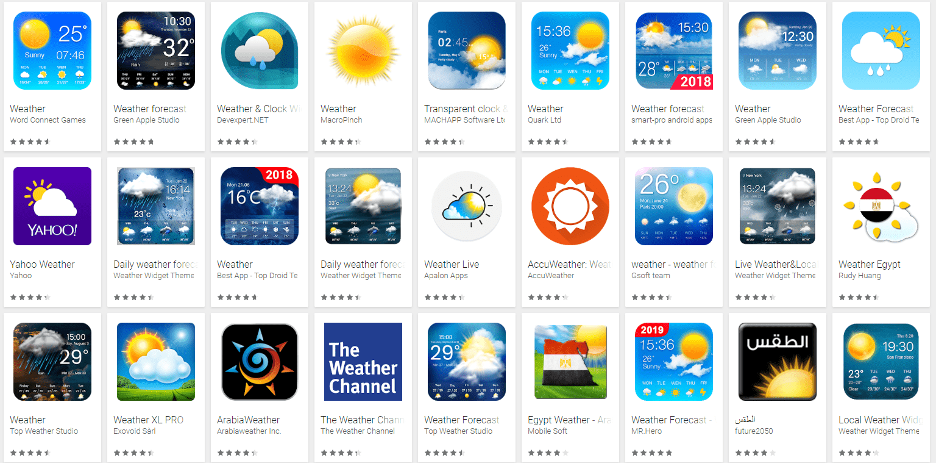
The app's name is no more than 30 characters for Google Play, while it can reach 50 characters in the App Store. That's almost 3:1 words. Your choice of name is entirely based on the location of your target audience, that is, if you target your audience in most parts of the world you must know what the name of the app means in the countries you target, your name of choice may have a strong meaning in English but it has a bad meaning in Spanish or Chinese.
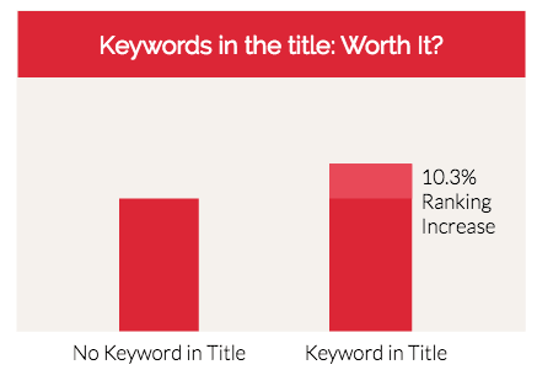
The keywords are preferably included in the name of the app, as the apps with keywords in their title came in 10.3% higher order in the ASO than apps without keywords.
• Second: description
It illustrates the key idea of the app, that is, it highlights the problem the app helped solve, and the most important features it includes. It illustrates the value provided through it. You have 4,000 characters to describe your app but that means the description will be carved out and the user has to press to see more, and here you must do your best to get the user's attention to read more. That's why Google Play recommends using a 80-letter description while in the App store it is preferable to have 255 letter of any of 3:2 paragraph.
While writing the description be brief, and illustrating the app's 3 most important features, avoid technical details, buzzwords and mysterious sentences, and take care of simple sentences with easy-to-understand details, as users tend to upload apps that make their lives better and will only know it through its own description.
Keywords have a big role in improving the app's ASO, so description sentences must contain the right keywords for the app, but provided you don't include too many useless words.
• Third: Screenshot footage
Screenshots of the app's use encounter, these shots help to illustrate the user experience, the first two shots best illustrate the purpose and benefits of the app, and can demonstrate how the app is used. The number of snaps on Google Play is preferably 8 while in the App Store it is preferable to be 4 shots.. Most applications use a standard number for both Google Play and App Store. If you add a description of the footage you don't forget to care about the keywords.
• Fourth: Icon
The icon must express what the application offers while being compatible with the name you have chosen; Because it's the first thing that catches the eye on your app. And to offer a distinctive icon you have to follow the guidelines for both iOS and Android.
• Fifth: Update of applications
Users prefer to upload always-updated apps; Because it shows that the brand cares about everything new and helps improve the user experience and focus on making their lives better and better. Comments and reviews match app updates as each new version should get better reviews and reviews than the previous version. So after you launch the app you never hesitate to update it if it needs to so your App Store ranking isn't affected.
• Sixth: reviews and evaluations
Reviews and evaluations affect the order of application in the ASO; Because if the app gets negative reviews it indicates that there is some problem in the app and you have to solve it, or that the app is not good enough that the user was waiting for.
5. Test the app
Before you launch the app to the public first test it you and your team to make sure there are no issues with the app, and if there is any technical issue or malfunction try to avoid it before the audience starts using it and because of it you get low reviews and reviews which are reflected in the reputation of the app.
To get your app to reach your target audience after it's finished programmatically and launched don't think it's over there because you have to complete your journey:
1. Take advantage of social media
As mentioned earlier, before you call the app social media exploitation and build an audience for it, After launching the app you will find that you have a proper audience who have been waiting for the app and are starting to upload and use it But never stop at this point ramping up your advertising campaigns to attract more audiences, And post some feedback and reviews that get you through your audience on the app. I'm telling stories about people who used the app and how it affected their lives in the affirmative, And don't forget to provide your audience with more content that helps them and just stop talking about your app.
2. Don't neglect search engines
If you think about finding any simple product, service, or even information, of course, you go to the search engine to answer what you think, so you can't neglect the search engines; Because it has a big role to play in guiding the public towards your app, there are 27% of people who know the app through search engines. That's why you have to set up your site or the Landing page for search engines by focusing on keywords and other factors.
Also ads have an important role, Google used Edwards to create ads for the app, with 50% of the target audience uploading the app through ads on search engines.
3. Encourage users to write comments and reviews
Take advantage of social media and the email list to encourage your audience to write comments and reviews of the app; Because customers trust the opinions and reviews of other customers more than the words of the brand itself. And don't forget to respond to those comments, both negative and positive, in order to create strong relationships with your target audience, and if there's a problem they're facing, try to inquire about it and give them a promise to solve it.
4. E-mail
Remember the email list I built before. And I used it to illustrate the features of your app, and introduce them to the most important updates that your app has come up with. And, of course, it was all through valuable and useful content for them, Now it was all about reaping all the effort I had made in the previous period. Send them the app upload links and ask them to send you their reviews and comments and make use of them in developing your app or even create useful stories from them to encourage the rest of your audience to experience the app.
5. Take advantage of your public relations
Take advantage of bloggers, journalists.. And others with whom you built strong relationships during the previous period of the app launch, let them talk about your app, provide them with enough information on the features of the app, icon photos, some footage of how to use it and if you have a video that explains everything you don't skimp on them, to make their mission easier, give them some of your customers' opinions and ratings to support the story that.
6. Start measuring how successful or unsuccessful the app is
To rest assured your app is doing well there are several metrics you have to analyse up-to-date to make sure you're on track and you can do it through these following tools and metrics:
• AppAnnie
• Sensor tower
• Fabric
• App store
• Play store
1. Number of downloads
Always follow how many uploads the app has reached to see how popular it is. Because if uploading the app is low there's definitely some problem with using it or you're not pursuing an effective marketing strategy that helps raise awareness of it.
2. Installation App Installation
It never means the user uploaded the app that they installed and used it. This is why you track the installations made by each user to find out who the app has installed and used.
3. Uninstall
Most apps lose 80% of users in the first 90 days of the app's launch. And uninstalling the app is because there's a technical issue with the app or the quality of the app is less than required or it's hard to use and in any case you have to look for and solve the problem so it doesn't affect your app's reputation and lose a large chunk of your audience.
4. Crashes crashes
If a user uploads your app and every period and another an issue or malfunction has occurred in the app, it shows that the app has issues that you have to intervene quickly and solve. That's why you have to track down all Crashes and figure out their causes and try to solve them so they improve the user experience, and in addition to Retention rate.
5. Updates
If you develop the app has anyone uploaded it or not, are your customers waiting for the new version of the app, are the reviews and reviews after the app update positive or is the update negatively affected.
6. User Growth Rate
Tracking users' growth rate to know whether you earn new users every period or not, this helps you see how effective the ads you create, as a result of PR efforts, is what happens after each app update.
7. Retention rate
It shows how many users came back to use the app after a period of time. This rate shows that the app is of high quality and has no Crashes, and is easy to use.
8. Length of the session
The amount of time users spend in the app per session. The more time a user spends, the more the app proves to be right for them.
9. Number of daily and monthly active users
Track the number of daily and monthly active users in the app, to find out who keeps using the app on a daily basis and thus demonstrates that it is useful to him and helps him improve his life.
10. Conversion rate
Number of transfers ÷ total number of visitors. It has two types:
• Free transfer rate: How users know the app through the free method, such as the free search process.
• Paid conversion rate: How users access the app through the paid method, through ads on social media, and pay-per-click.
Mobile is indispensable in our daily lives; So you have to know how to use it in your marketing plan to reach your customers wherever they are.
 EN
EN


